When the world speeds up, sometimes our music needs to slow down. Imagine your favorite track, its tempo gently eased, its melodies stretched into lingering echoes, each note wrapped in a vast, dreamlike ambiance. This isn't just a simple edit; it's a profound transformation known as "slowed and reverb," and it's redefining how we connect with sound. Understanding slow reverb effects isn't just about tweaking parameters; it's about unlocking a deeper emotional resonance, turning familiar tunes into introspective journeys and powerful sonic statements. It's a technique that adds weight, space, and a certain melancholic beauty, transforming a song's mood from upbeat to ethereal, from direct to deeply contemplative.
At a Glance: Key Takeaways
- Mood Maker: Slow reverb drastically alters a song's emotional tone, creating dreamlike, melancholic, or introspective atmospheres.
- Core Ingredients: It combines a slower tempo (lower BPM) with a significant reverb effect, stretching both vocals and instruments.
- Creative vs. Legal: While easy to create, publishing or monetizing slowed and reverbed tracks requires strict copyright permission from original artists, as they are considered derivative works.
- Reverb's Anatomy: Master elements like Pre-Delay, Decay Time, Wet/Dry Mix, and EQ to achieve a professional, clear sound.
- DIY Friendly: Accessible tools range from free software like Audacity to professional DAWs and specialized online generators.
- More Than a Trend: Evolved from "chopped and screwed" culture, it's now a dominant aesthetic on platforms like TikTok, influencing how Gen Z experiences music.
Beyond the Echo: What Exactly is Slow Reverb?
At its heart, "slowed and reverb" is an audio alchemy. It takes a piece of music and subjects it to two primary processes: decreasing its tempo (BPM) and then applying a rich, expansive reverberation effect. The result is a soundscape that feels simultaneously stretched and enveloped, pulling the listener into a new dimension of the familiar.
The tempo reduction lengthens every element – vocals, instruments, beats – giving the music a heavier, more deliberate pulse. This stretching often infuses the track with a newfound gravitas or a profound sense of yearning. Complementing this, reverb, or reverberation, simulates the natural reflections of sound in a physical space, like a concert hall or a vast canyon. When applied generously in slowed tracks, it creates a lingering "tail" after each sound, adding depth, space, and an almost misty, surreal quality. It’s like listening to music in a dream, where the edges blur, and emotions take center stage.
This combination shifts the music from an active listening experience to an immersive, often introspective one. It can make a pop anthem feel like a haunting ballad, or a hip-hop track sound like a meditative sound bath. The power lies in its ability to evoke complex emotions: melancholy, nostalgia, profound calm, or even a sense of beautiful dissociation.
A Brief History of Sonic Transformation
The concept of radically altering a song's tempo and texture isn't new; it has deep roots in a subculture that emerged decades ago.
From Chopped & Screwed to Dreamy Atmospheres
The lineage of slowed music traces directly back to Houston in the 1990s, where DJ Screw pioneered "chopped and screwed" music. This technique involved manually slowing down cassette tapes, often dramatically, and incorporating scratching, stop-time, and other unique effects to create a gritty, hypnotic, and often unsettling vibe. It was a raw, visceral sound that became synonymous with the Southern hip-hop scene and influenced a generation.
Fast forward to the late 2010s and early 2020s, and a gentler, more atmospheric descendant began to emerge, particularly on YouTube. Creators started to take popular songs and apply a more subtle tempo reduction, crucially adding a generous layer of reverb without the heavy pitch distortion characteristic of earlier "screwed" tracks. This new aesthetic was less about grit and more about atmosphere, creating a dreamy, melancholic mood. Viral examples, like various edits of Lil Uzi Vert’s “20 Min,” propelled the trend, leading to dedicated channels like Rum World and Hound Dog, which often paired these sonic transformations with moody anime or vaporwave visuals, cementing a new subgenre.
The TikTok Phenomenon: Moods and Memes
The true explosion of slowed + reverb came with TikTok. The platform's short-form video format and emphasis on aesthetic quickly adopted these altered tracks as a shorthand for specific moods. Suddenly, slow-motion sunsets, rainy car rides, or introspective montages were perfectly soundtracked by familiar songs transformed into wistful echoes.
For Gen Z, slowed + reverb became more than just a musical trend; it morphed into a cultural phenomenon and a coping mechanism. It offered a relaxing, immersive escape, a way to process emotions like heartbreak and nostalgia, or simply a soundtrack for calm contemplation. While some might dismiss it as a simple, easily reproducible effect, many argue it's an art form, requiring careful track selection, precise tempo adjustments, the right reverb type (like a vast Hall or ethereal Plate), and a keen eye for accompanying visuals. This intentionality elevates it beyond mere button-pushing.
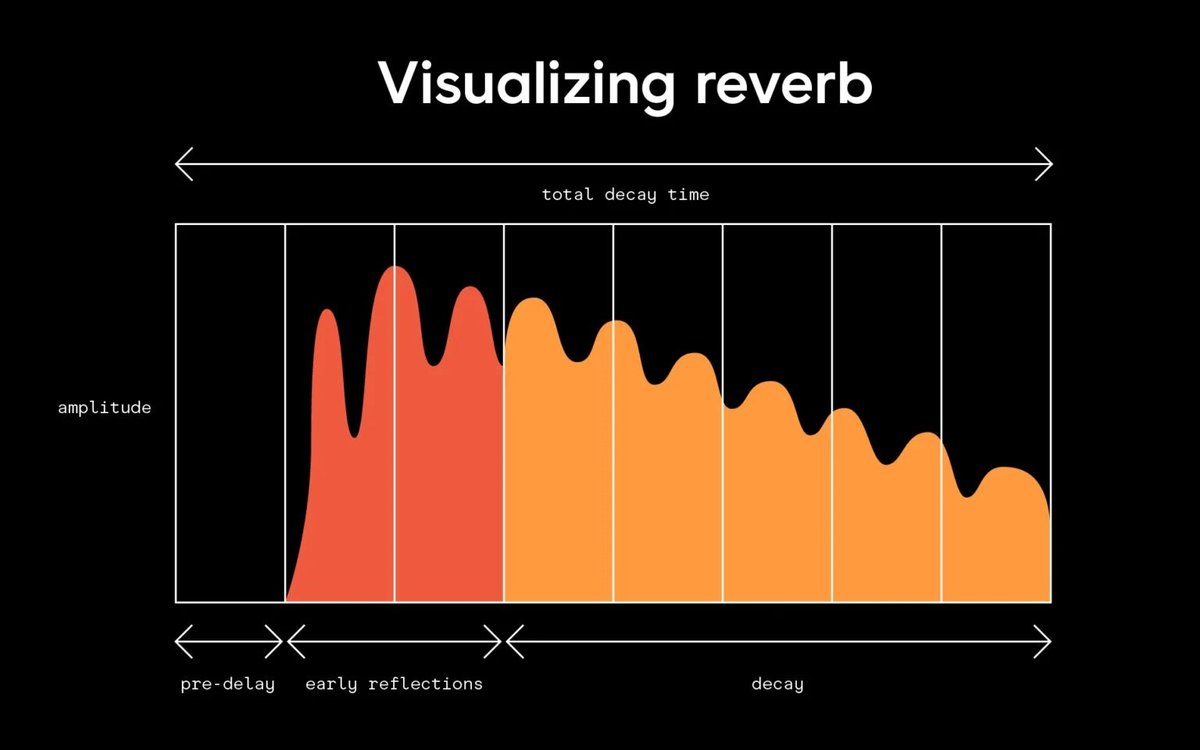
The Anatomy of Reverb: Core Elements You Need to Master
To truly command the slow reverb effect, you need to understand the building blocks of reverberation itself. These aren't just technical sliders; they're expressive tools that shape the very emotional landscape of your sound.
Pre-Delay: Giving Your Sound Room to Breathe
Pre-delay is the brief pause between the initial, dry sound hitting your ears and the onset of its reverberated reflection. Think of it as the time it takes for sound to travel from a stage to the back wall of a concert hall before bouncing back.
- Why it matters: A well-set pre-delay ensures clarity. If the reverb starts too quickly, it can mask the original sound, especially vocals. A setting of 10-20 milliseconds for vocals, for instance, allows the dry signal to be heard distinctly before the 'wet' reverb washes in, creating a sense of natural space without mud.
Decay Time: Shaping the Fade
Decay (or Reverb Time) determines how long the reverberation persists and gradually fades out. It dictates the "size" of your virtual space.
- Why it matters: Longer decay times create vast, epic, or dreamy spaces, perfect for the melancholic nature of slowed tracks. Shorter decays are better for quicker songs or when you want less wash. Matching the decay to the track's tempo is key; too long on a fast track and you get a sonic mess; too short on a slow track and you lose the atmospheric magic.
Wet/Dry Mix: Finding Your Balance
The Wet/Dry Mix controls the ratio between the original, unprocessed (dry) sound and the fully reverberated (wet) sound.
- Why it matters: This is where you prevent your mix from becoming a blurry, indistinct swamp. Too much "wet" signal, and your music will sound distant, muddy, and lacking punch. Too little, and you lose the atmospheric depth. Finding that sweet spot is crucial – often, you'll want more wet signal than a typical mix, but still enough dry to maintain clarity and presence.
EQing Your Reverb: Clarity in the Mist
Applying EQ (Equalization) to your reverb effect is an often-overlooked secret weapon for professional-sounding mixes.
- Why it matters: Reverb, especially long, lush reverb, can quickly accumulate low-end rumble and high-end harshness, leading to a muddy or piercing sound. Using high-pass and low-pass filters on your reverb send (not directly on the dry signal) allows you to sculpt its frequency response. Typically, filtering out frequencies below 600 Hz (high-pass) prevents muddiness, and rolling off above 10 kHz (low-pass) can smooth out any harshness, leaving you with a clean, airy, yet deep reverb tail.
Different Flavors: Hall, Plate, Room & Beyond
Reverb comes in various "types," each designed to simulate different acoustic environments or mechanisms.
- Hall Reverbs: Mimic large concert halls, offering long, expansive decays and a rich, natural sound. Ideal for orchestral elements or creating a sense of grand scale.
- Plate Reverbs: Emulate the sound of early mechanical reverb units using large metal plates. They have a bright, dense, and smooth sound, often favored for vocals and drums for a classic shimmer.
- Spring Reverbs: Produce a distinctive, somewhat metallic "boingy" sound from springs. Commonly found in guitar amplifiers, great for adding a vintage, surf-rock vibe.
- Room Reverbs: Simulate smaller, more intimate spaces. These are excellent for adding subtle space to vocals or instruments without making them sound distant, maintaining clarity and warmth.
- Why it matters: Experimenting with these types is key to finding the right ambiance for your slowed track. A room reverb might add intimacy, while a hall reverb could create vast melancholy.
Strategic Layering: Building Sonic Worlds
Don't feel limited to a single reverb. Combining multiple reverb effects on different tracks or even subtly blending types can create incredible depth and dimension.
- Why it matters: You might use a short, intimate room reverb on vocals, a medium plate reverb on a lead synth, and a very long, expansive hall reverb on a pad or drone, all working together to create a complex, multi-layered sonic environment. This prevents all elements from sounding like they're in the exact same space, adding a sophisticated richness to your mix.
Slowed + Reverb vs. LOFI: Unpacking the Nuances
While both slowed + reverb and LOFI music often aim for nostalgic or calming moods, they achieve this through distinct sonic characteristics.
LOFI (short for low fidelity) deliberately embraces imperfections. It's characterized by elements like vinyl crackle, tape hiss, muted drums, warm analog saturation, and often heavy compression. The aesthetic is raw, unpolished, and reminiscent of old recordings, designed to evoke a cozy, nostalgic, and often understated chill vibe. The focus is on texture, warmth, and a sense of imperfection.
Slowed + Reverb, on the other hand, prioritizes the transformation of space and time. Its core elements are the dramatic reduction in tempo and the application of expansive, often pristine reverb. While it can also be relaxing, its mood tends towards the dreamy, melancholic, surreal, or vast. The emphasis is on stretching, lingering echoes, and creating an immersive, sometimes ethereal soundscape, rather than raw fidelity. The clarity of the original sound is often maintained, just draped in more space and time.
Think of it this way: LOFI is like listening to an old, worn-out cassette tape on a rainy day. Slowed + Reverb is like listening to the same song echo across a vast, empty landscape under a twilight sky.
Crafting Your Own Slow Reverb Masterpiece: A Step-by-Step Guide
Ready to dive in and transform your favorite tracks? You have a range of tools at your disposal, from free desktop software to professional digital audio workstations (DAWs) and convenient online generators.
Essential Software Tools
For those who prefer a hands-on approach with more control, desktop software offers robust features.
Audacity: Your Free Starting Point
Audacity is a powerful, free, open-source audio editor available for Windows, macOS, and Linux. It's an excellent entry point for learning.
- Import Your Song: Go to
File > Openand select your audio track. - Select the Track: Click anywhere on the waveform or press
Ctrl+A(Windows) /Cmd+A(Mac) to select the entire track. - Slow Down: Navigate to
Effect > Pitch and Tempo > Change Speed. Drag the slider leftward to decrease speed or enter a negative percentage. Use the "Preview" button to hear your changes, thenApply. - Add Reverb: Go to
Effect > Delay and Reverb > Reverb. This effect has several parameters like Room Size, Pre-Delay, and Reverberance. Experiment with presets or adjust individual settings to your liking. Again, "Preview" before youApply. - Export: When satisfied, go to
File > Exportand choose your preferred format (e.g., MP3 or WAV).
GarageBand: Apple's Intuitive Studio
For Mac users, GarageBand provides a user-friendly environment.
- Adjusting BPM for Audio: Double-click the audio track in the timeline to open the Audio Editor. Check the box labeled "Enable Flex." Now, in the
Time Positiondisplay at the top, you can manually input a desired BPM. - Using the Tempo Track: For more dynamic tempo changes, press
Shift + Command + Tor go toTrack > Tempo Track. Add blue automation points along the tempo line and drag them downward to slow the BPM at specific sections. Place multiple points around your adjustment areas to prevent unintended global changes. - Adding Reverb: Select your track, then in the Smart Controls (often accessed by clicking the 'i' icon), you'll find various effect slots. Add a "Reverb" effect and tweak its parameters to get your desired wash.
Ocenaudio: Another Free Powerhouse
Ocenaudio is another free, easy-to-use audio editor known for its clean interface and speed.
- Open Audio:
File > Opento load your track. - Select All:
Ctrl+A(Windows) /Cmd+A(Mac) to highlight the entire waveform. - Slow Down: Go to
Effects > Time and Pitch > Time/Pitch Adjust. Increase the "Time Stretch" percentage. You can also enable "Optimize for speech processing" for vocal tracks. Preview andApply. - Add Reverb: Navigate to
Effects > Delay > Reverb. Here, you can customize parameters like Depth, Decay, and Blend. Preview your changes before applying. - Save/Export: Use
File > Exportto save your final audio in your chosen format.
Professional DAWs: Ableton, Logic, FL Studio & More
For serious creators, Digital Audio Workstations like Ableton Live, Logic Pro X, FL Studio, and Adobe Audition offer the most comprehensive control.
- Time-Stretching: All these DAWs have robust time-stretching algorithms. In Logic Pro X, for instance, you can use the Varispeed function, while Ableton Live's Warp modes are incredibly versatile for tempo manipulation.
- Advanced Reverb: These DAWs come with high-quality built-in reverb plugins (e.g., Logic's Space Designer or ChromaVerb) and support third-party plugins, offering unparalleled sound design possibilities for reverb.
Quick Online Solutions: Instant Gratification
If you're looking for a quick and easy way to experiment without installing software, several online tools offer a streamlined experience. These are excellent for exploring how a slow reverb generator works without a deep dive into audio editing.
- slowedandreverb.studio: Upload an MP3, adjust intensity, preview, and save as WAV.
- slowedreverb.com: Simple interface for MP3 uploads, parameter adjustments, and MP3 downloads.
- Audioalter.com: Supports various formats (MP3, WAV, FLAC, OGG) for uploads and downloads the processed song in MP3.
- slowandreverb.netlify.app: Offers direct controls for playback rate and reverb intensity with a preview function before downloading.
These platforms often provide a simple way to get started, letting you focus on the creative outcome rather than the technical minutiae. If you're curious to explore slow reverb generator options further, these web-based tools are a fantastic jumping-off point.
Hardware for the Hands-On Creator
For DJs or those who appreciate tactile control, hardware offers real-time manipulation.
- DJ Equipment: Turntables, CDJs, and dedicated DJ controllers often feature tempo control knobs or sliders that allow for immediate speed adjustments. While adding reverb might require external effects units or software integration, the core slowing effect is readily available.
Navigating the Legal Landscape: Copyright and Creativity
While creating slowed + reverb tracks can be incredibly creatively fulfilling, it's crucial to understand the legal implications, especially if you plan to share or monetize your work.
Derivative Works: What You Need to Know
A slowed and reverbed song is considered a derivative work. This means it's based on one or more pre-existing works and substantially transforms the original. Under copyright law, only the original copyright holder (the artist, songwriter, or record label) has the exclusive right to create or authorize derivative works.
Playing by the Rules: Monetization and Permissions
Publishing or monetizing slowed and reverbed songs on platforms like YouTube, SoundCloud, or Spotify without proper authorization can lead to serious legal consequences. These can include:
- Copyright Strikes: Platforms may flag your content.
- Demonetization: Your video or track won't earn revenue.
- Takedowns: The content can be removed entirely.
- Legal Action: In severe cases, copyright holders can pursue legal action.
It is paramount to obtain copyright permissions from the original creators before uploading or monetizing. Many creators operate within the bounds of "reinterpretation" and diligently credit original artists, but this alone doesn't grant you the right to monetize. Licensing music can be complex, involving mechanical licenses, synchronization licenses, and sometimes master recording licenses. If in doubt, assume you need permission. This is especially true if you are looking to generate slow reverb tracks for commercial use. Always review platform-specific copyright guidelines and legal advice.
Common Pitfalls to Avoid on Your Slow Reverb Journey
Creating effective slow reverb tracks requires finesse. It’s easy to cross the line from atmospheric to amorphous. Here are common mistakes to steer clear of:
The Muddy Mix: Overdoing It
The most frequent error is simply overusing reverb. While the goal is spaciousness, an excessive "wet" signal can quickly turn your beautiful, dreamy sound into a chaotic, indistinct mess. The individual elements of the song – the vocals, the drums, the melodies – will lose their clarity and definition, blending into a sonic soup where nothing stands out. Remember, reverb should enhance, not consume.
Lost in Time: Mismatched Tempos
When you're trying to integrate slowed elements into a larger DJ set or a remix project, ignoring tempo matching can lead to jarring, awkward transitions. Simply slowing down a track without considering its harmonic or rhythmic relationship to other elements can disrupt the flow and energy of your mix. Always pay attention to the new BPM and how it interacts with the surrounding musical context.
Ignoring the EQ: Letting Frequencies Clash
As mentioned earlier, neglecting to EQ your reverb is a critical mistake that can lead to either a boomy, muddy low end or a harsh, piercing high end. Reverb naturally adds frequencies across the spectrum, and without careful sculpting, it can easily clash with other instruments in your mix. Think of EQ as cleaning up the edges of your reverb, ensuring it sits beautifully within the overall soundscape without overcrowding it or causing sonic fatigue.
Unlocking Deeper Moods: Your Next Steps
Mastering slow reverb effects is a journey into emotional sound design. You now understand the history, the technical elements, the tools, and the crucial legal considerations. The true power of this technique lies in its ability to transform a familiar sound into a deeply personal experience, turning a simple song into a reflective narrative.
Whether you're using a free software like Audacity, experimenting with a dedicated online slow reverb generator, or diving deep with a professional DAW, the principles remain the same: balance the tempo reduction with thoughtful reverb application. Listen critically, experiment with different reverb types and settings, and always keep clarity and emotional impact at the forefront of your creative choices.
Start by choosing a song you know intimately, and see how subtly altering its pace and enveloping it in space can reveal entirely new layers of feeling. Your goal isn't just to make it "slow and reverbed," but to craft a specific mood, to tell a new story with sound. The world of deep, resonant musical atmospheres is waiting for you to explore.