It began as a subterranean rumble, a fan-made subgenre whispered through online communities, then exploded into a pervasive aesthetic. We're talking about Slowed + Reverb, a distinct style of music production that transforms tracks into expansive, often melancholic soundscapes. What started as simple remixes on YouTube and TikTok, lovingly dubbed "Daycore" (a flip of the sped-up "Nightcore"), has now permeated mainstream music production, with artists embracing and officially releasing their own hazy, stretched-out versions.
But how do you actually create that signature, immersive sound? It's more than just hitting a "slow" button and slapping on some reverb. It’s an art form that blends deliberate tempo shifts with cavernous spatial effects, demanding a nuanced understanding of audio manipulation. This guide will walk you through the precise techniques for generating slow reverb, empowering you to craft tracks that resonate with depth and emotion.
At a Glance: Mastering Slow Reverb
- Understand the Core: Slowed + Reverb involves deliberately slowing down a track while adding extensive, often lush, reverb effects to alter its emotional tone.
- Choose Your Weapon: Use dedicated online generators for quick results, or dive into a Digital Audio Workstation (DAW) for maximum creative control.
- Tempo is Key: Learn to slow down audio effectively, understanding the impact on pitch and how to preserve it if desired.
- Reverb's Role: Experiment with pre-delay, decay, size, and dry/wet mix to sculpt the perfect spatial signature.
- Mind the Bass: Use bass boost carefully to enhance the low end, but always pair it with a limiter to prevent clipping.
- Legal Landscape: Know the rules for commercial release, especially when remixing copyrighted material.
The Allure of the Slowed + Reverb Sound
Before we dive into the nuts and bolts, let's appreciate why this technique captivates so many. Slowed + Reverb isn't just a technical trick; it's an emotional amplifier. By reducing the tempo, the listener is drawn into the details of a song, allowing melodies to linger, harmonies to breathe, and rhythms to feel more deliberate and weighty. The added reverb then expands this newly stretched sound into a vast, often ethereal space, evoking feelings of nostalgia, introspection, or a dreamy melancholy. It’s like stepping into a familiar painting, only to find it rendered on a much larger, more immersive canvas.
This unique sonic texture can lend a track a new sense of gravitas, making fast-paced pop songs feel profound or already somber pieces take on an almost spiritual quality. It’s a powerful tool for reinterpretation and for crafting entirely new moods.
Your Toolkit: Online Generators vs. DAWs
When it comes to generating slow reverb, you essentially have two main paths: quick-and-easy online generators or the deep-dive versatility of a Digital Audio Workstation (DAW). Both have their merits, and understanding them helps you choose the right approach for your project.
Method 1: Instant Gratification with Online Generators
For those looking to quickly experiment or create a slowed + reverb version without the learning curve of a full DAW, online generators are a fantastic starting point. These tools streamline the process, often requiring just a few clicks.
How Online Generators Work (Example: Soundplate Online Generator)
Tools like Soundplate's free online Slowed & Reverb Generator simplify the entire process. Here’s a typical workflow:
- Upload Your Track: Head to the generator's website and upload your audio file. WAV files are generally recommended for the best quality, but most tools support MP3s as well.
- Tweak the Settings: This is where you dial in your desired sound.
- Keep Pitch: This crucial setting attempts to maintain the original key of the song even as the tempo changes. Be aware that significant tempo shifts with "Keep Pitch" enabled can sometimes introduce unusual artifacts or sonic oddities, especially on complex tracks. It’s a trade-off between natural-sounding tempo alteration and pitch preservation.
- Reverb Type: Many generators offer different reverb algorithms to simulate various spaces (e.g., hall, plate, room). Experiment to find the one that best suits your track's mood.
- Bass Boost: This feature allows you to emphasize the low frequencies, adding weight and punch, which often complements the slowed aesthetic.
- Q Parameter: This controls the width of the frequency range being boosted. A narrow Q focuses the boost on a very specific frequency (e.g., ~50 Hz for a tight kick drum thump), while a wide Q affects a broader range of bass frequencies.
- Boost Amount: You can typically choose from a subtle 1 dB to an extreme 12 dB or more. Start small and listen carefully.
- Limiter: This is your essential safeguard. When you boost bass or add heavy reverb, the overall volume (gain) of your track can increase significantly, potentially leading to digital clipping (a harsh, distorted sound). A limiter prevents this by ensuring the output signal never exceeds 0 dB.
- Attack Time: Dictates how quickly the limiter responds to sudden volume peaks.
- Release Time: Controls how quickly the limiter recovers after reducing volume.
- Generate and Download: Once your settings are chosen, hit "Generate" or "Process." The tool will render your new track, ready for download.
Another excellent example is SlowedAndReverb.Studio, which offers a similar straightforward experience: - Access: Go to SlowedAndReverb.Studio.
- Upload: Click "Choose an Audio File" and select your audio.
- Adjust: Play with Speed (e.g., 0.8x for 80% of original speed) and Reverb (e.g., 10%). The beauty of these tools is often the real-time or near real-time previewing as you adjust settings.
- Download: Once you’ve landed on the perfect vibe, click "Download remix."
While convenient, remember that free online generators often have limitations, such as daily export limits (e.g., Soundplate restricts users to 5 exports within 24 hours). For more detailed control and professional results, diving into a DAW is the next logical step. If you're eager to try one out right now, you can Explore the slow reverb generator on Soundplate.
Method 2: Precision Crafting in a Digital Audio Workstation (DAW)
For producers who demand granular control over every aspect of their sound, a DAW (like Ableton Live, Logic Pro, Pro Tools, FL Studio, or even Audacity for basic tasks) is the ultimate environment. This method offers unparalleled flexibility, allowing you to fine-tune both the slowing and the reverb effects.
Let's use Ableton Live as our primary example, but the core principles apply across most DAWs.
- Import Your Audio: Start by dragging and dropping your chosen song onto an audio track in your DAW. For optimal quality, always work with the highest resolution audio file you have available.
- The Art of Slowing Down: This is where DAWs offer far more nuance.
- Tempo and Pitch Alteration: In Ableton, double-click the audio clip to open its editor. Initially, you might see "Warp Mode" enabled. Turn Warp Mode OFF for this specific technique if you want to alter both pitch and tempo simultaneously, which is a common characteristic of the classic slowed sound.
- Adjusting Pitch/Tempo: With Warp Mode off, use the "Transposition" or "Pitch" wheel (or a similar control, depending on your DAW) to pitch down the track. For example, pitching down -2 semitones might naturally change a 140 bpm track to around 123.36 bpm, introducing both the slowdown and a lower, richer pitch. This method can feel very organic.
- Warp Mode (Alternative): If you only want to slow down the tempo without changing the pitch (like the "Keep Pitch" option in online generators), then keep "Warp Mode" ON and select an appropriate warping algorithm (e.g., "Complex Pro" for full tracks). Then, simply adjust the clip's tempo or the master project tempo. Be mindful that extreme tempo changes with pitch preservation can sometimes introduce sonic artifacts, sounding "stretchy" or unnatural. Experimentation is key to finding the right balance for your source material.
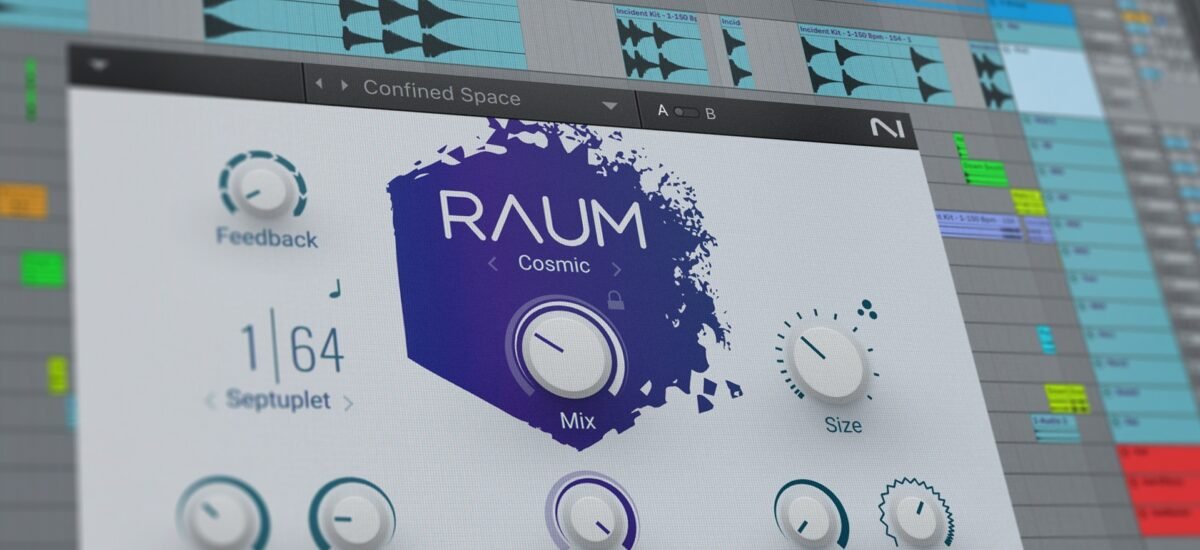
- Applying Reverb with Finesse: This is where you sculpt the immersive space. Add a reverb effect to your track's effects chain. Most DAWs come with excellent stock reverb plugins, but many third-party options offer even more sonic variety.
- Pre-delay: This sets the time before the reverb effect begins. A short pre-delay (e.g., 0.50 ms) makes the sound appear to start immediately within the reverberant space. A longer pre-delay (e.g., 50-100 ms) creates a sense of the original sound hitting a distant wall before its reflections return, adding clarity to the original source. For slow reverb, shorter pre-delays often contribute to a more immediate, enveloping feel.
- Size (or Room Size): This parameter dictates the perceived size of the simulated space. Larger sizes create longer, more expansive decays. For a "slow" reverb, you'll often lean towards larger sizes to evoke a vast, open atmosphere.
- Decay (or Reverb Time): This is arguably the most critical setting for slow reverb. It determines how long the reverb tail lasts. You'll want a significantly longer decay time than typical mixes—think 500 ms to several seconds (e.g., 710 ms as a starting point). This is what creates that lingering, ethereal quality.
- Stereo (or Width): Controls the stereo image of the reverb. Wider settings (e.g., 32.38%) can make the reverb feel more expansive and surrounding.
- Reflect & Diffuse (Advanced):
- Reflect: Controls the initial, distinct reflections that hit your ear.
- Diffuse: Manages the density and complexity of the later, more smeared reflections. Adjusting these can help you fine-tune the texture of the reverb, making it smoother or more textured. Often, lowering these slightly (e.g., Reflect: -30 dB, Diffuse: -13 dB) can make the overall reverb sound less overwhelming and more atmospheric.
- Dry/Wet Mix: This fader balances the original, unprocessed ("dry") signal with the fully reverbed ("wet") signal. For slow reverb, you'll typically want a higher wet component (e.g., 10-30%, or even more on an auxiliary send). A good starting point might be 10%, but feel free to push it further, perhaps even 50% or more when using a return track for reverb.
A Note on Auxiliary Sends (Return Tracks): For more professional mixing and better control, it's often preferable to put your reverb on an auxiliary (or return) track. This allows you to send varying amounts of signal from multiple tracks to a single reverb effect, making the mix sound more cohesive within the same space. When using a return track, the reverb's dry/wet knob should usually be set to 100% wet, and you control the amount of reverb for each track using its individual send knob.
Deep Dive: Mastering the Parameters for the Slowed Effect
Understanding what each parameter does is one thing; knowing how to wield it for the signature slowed + reverb sound is another.
Sculpting Time: Beyond Simple Slowdown
When slowing down audio, consider the emotional impact:
- Pitch-Shifted Slowdown (Warp Off in Ableton): This approach naturally lowers the pitch as the tempo decreases. The result is often darker, heavier, and more melancholic. It can make vocals sound deeper and instruments richer, contributing to a truly transformative effect. This is often the hallmark of the classic "slowed + reverb" sound.
- Tempo-Only Slowdown (Warp On, Pitch Maintained): This preserves the original key and character of the instruments and vocals while stretching out the performance. It can create a dreamy, suspended-in-time feel without the dramatic shift in vocal timbre. However, as noted, listen carefully for artifacts.
Pro Tip: Don't be afraid to experiment with very subtle tempo changes (e.g., 0.9x speed) or more drastic ones (e.g., 0.7x). The ideal slowdown depends entirely on the original track and the mood you're aiming for.
The Art of the Infinite Wash: Reverb Settings
For the signature slow reverb sound, think "epic" and "endless."
- Decay Time is King: This is your primary control for the "slow" feeling. Push it. We're talking 3 seconds, 5 seconds, even 10 seconds or more, depending on the track. The goal is for sounds to smear and linger, blending into a continuous wash.
- Large Room Sizes: Opt for algorithms that simulate large halls, churches, or vast spaces. This naturally provides the space for those long decay times.
- Minimal Pre-Delay: While longer pre-delays can add clarity, for an enveloping slow reverb, often a very short or zero pre-delay helps the sound immediately plunge into the cavernous space. This creates a sense of being within the reverb from the start.
- High Dry/Wet (or Send Level): You want the reverb to be prominent. If using an insert effect, a dry/wet mix of 20-50% is common. If using a send/return, push the send level high to ensure the reverb is a dominant element in the mix.
- EQing Your Reverb: A secret weapon for clarity! Reverb, especially long ones, can quickly make a mix muddy. Apply an EQ after your reverb plugin on the return track.
- High-Pass Filter: Roll off some low frequencies (e.g., below 200-300 Hz) to prevent the reverb from making the bass heavy and indistinct.
- Low-Pass Filter: Gently roll off some high frequencies (e.g., above 6-8 kHz) to soften the reverb, making it less harsh and more ambient. This gives it a "darker" quality often associated with the slowed aesthetic.
Punching Up the Low End: Bass Boost & Limiting
The slowed sound often benefits from a bolstered low end, giving it a heavier, more impactful feel.
- Strategic Bass Boost: Use an EQ or a dedicated bass boost plugin. A gentle shelf boost across the lower frequencies (e.g., 60-150 Hz) or a focused bell boost around 50-80 Hz can add warmth and power. Remember the "Q" parameter from the Soundplate generator: a narrower Q for surgical boosts, a wider Q for a general thickening.
- The Indispensable Limiter: Whenever you boost bass or apply heavy reverb, the peak levels of your audio will increase. A limiter placed at the very end of your master chain (or on individual tracks if needed) is crucial to prevent clipping. Set the output ceiling to 0 dB (or -0.1 dB for safety) and adjust the threshold until the loudest peaks are just gently caught.
- Attack & Release: For a general master limiter, fast attack and release times often work well to transparently catch peaks. However, for creative use, you can experiment. A slightly slower attack can allow some transients through, while a slower release can add sustain to the overall sound.
Creative Applications and Best Practices
Generating slow reverb isn't just about remixing; it's a creative technique you can apply to original productions or even specific elements within a song.
- Original Compositions: Imagine starting a track with the slowed + reverb aesthetic in mind. How does this influence your melody writing, chord progressions, or drum programming? It can lead to truly unique textures.
- Specific Instruments: Don't just apply it to the whole track. Try slowing down and reverbing just the vocals, a lead synth, or a drum loop. This can create interesting layers and contrasts within a regular-tempo song.
- Sound Design: Use the technique to generate atmospheric pads or ethereal sound effects from otherwise mundane samples.
- Choosing Your Source Material: While any track can be slowed and reverbed, some lend themselves better to the process. Tracks with clear melodies, sustained chords, and interesting rhythmic elements often transform beautifully. Overly dense, chaotic, or extremely fast tracks might become a muddy mess.
Avoiding Common Pitfalls
- Over-Reverb: While the goal is a lot of reverb, there's a point of no return where clarity is completely lost, and the track just sounds like a blurry wash. Use EQ on your reverb returns to maintain some definition.
- Muddy Bass: Over-boosting the bass or letting the reverb consume the low end can make a track indistinct and unpleasant. High-pass filter your reverb and manage your bass boost.
- Clipping: Always, always use a limiter. It's the simplest way to ensure your output is clean and won't distort.
- Loss of Impact: If you slow a track down too much, or drench it too heavily in reverb, it can lose its energy and become boring. The goal is atmosphere, not auditory oblivion. Find the sweet spot.
The Legal Side: Commercial Release of Slowed + Reverb Remixes
This is a critical, often overlooked aspect, especially given the fan-created origins of the style. If you plan to share your slowed + reverb creations beyond personal listening, you need to understand the legalities.
- Your Own Original Work: If you own the original track, it contains no copyrighted material from others, and is not signed to any third party (like a record label or publisher), you can freely create and commercially release slowed + reverb remixes of your own work.
- Remixing Someone Else's Work: This is where it gets tricky. Creating a slowed + reverb version of someone else's song is considered a "derivative work." To legally release such a remix commercially, you must obtain explicit permissions (licenses) from the original artist and/or their record label and publisher. This often involves negotiating mechanical licenses, synchronization licenses, and sometimes even master recording licenses, which can be complex and costly. Without these permissions, you risk copyright infringement.
- Fair Use? While "fair use" (in the US) allows limited use of copyrighted material without permission for purposes such as commentary, criticism, news reporting, teaching, scholarship, or research, simply creating a slowed + reverb version for general consumption or profit is unlikely to fall under this defense.
- Platforms and Monetization: Be aware that platforms like YouTube and TikTok have sophisticated content ID systems. Even if you don't intend to monetize, an unauthorized remix can be flagged, muted, or taken down. Monetizing an unauthorized remix is almost guaranteed to lead to action from copyright holders.
Always err on the side of caution. If in doubt, secure the necessary rights or stick to remixing your own original, cleared content.
Which Method is Right for You? A Decision Guide
| Feature | Online Generator (e.g., Soundplate, SlowedAndReverb.Studio) | DAW (e.g., Ableton Live, Logic Pro) |
|---|---|---|
| Ease of Use | Extremely high, often point-and-click. | Moderate to high, requires learning software interface and concepts. |
| Speed of Creation | Very fast, near-instant results. | Slower, involves setup, detailed adjustments, and rendering time. |
| Creative Control | Limited to predefined settings and parameters. | Virtually unlimited, full control over every aspect of sound. |
| Quality/Fidelity | Good for quick remixes; can have artifacts with extreme settings. | Professional-grade; artifacts minimized with proper technique/algorithms. |
| Learning Curve | Minimal. | Significant, but transferable to all areas of music production. |
| Cost | Often free (with potential limitations), or low-cost subscriptions. | Requires investment in software (free trials available). |
| Best For | Casual experimentation, quick fan edits, beginners. | Professional remixes, original productions, sound designers, advanced users. |
| Limitations | Export limits, less unique sound, potential artifacts with extreme changes. | Requires dedicated software, more time investment. |
Final Thoughts: The Art of the Haze
Generating slow reverb is a versatile technique that can breathe new life into existing tracks or inspire entirely new sonic creations. Whether you opt for the simplicity of an online generator or the precision of a DAW, the true power lies in your understanding of how tempo, space, and dynamics intertwine.
Don't be afraid to push the boundaries of your chosen tools. Experiment with different reverb types, tweak decay times to absurd lengths, and play with the balance of dry and wet signals. Listen critically, refine your settings, and discover the unique emotional landscapes you can conjure. The slowed + reverb style is more than a trend; it's a testament to the transformative power of sound, waiting for you to make your mark.