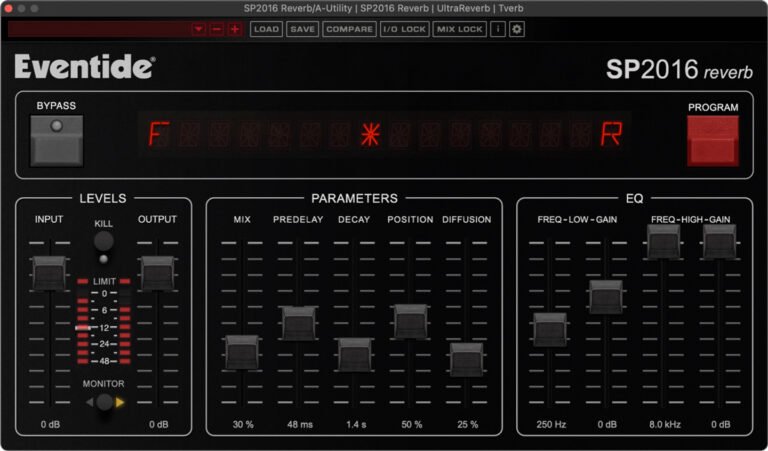
Imagine your mix as a canvas. You've painted the melody, sketched the harmony, and added the rhythm. But what about the atmosphere? The sense of a living, breathing space that cradles your sound and draws the listener in? That’s the magic of reverb, and few elements offer more emotional resonance than a beautifully crafted slow reverb. Optimizing slow reverb parameters isn't just a technical tweak; it's an art form, a crucial skill for adding unparalleled depth, space, and a touch of the sublime to your tracks, especially vocals.
This isn't about slapping on a preset and calling it a day. It's about understanding the subtle power each dial holds, mastering the craft to sculpt sonic environments that captivate. When done right, slow reverb can elevate a simple vocal or instrument into an ethereal experience.
At a Glance: Crafting Your Perfect Slow Reverb
- Pre-Delay is your clarity gate: Crucial for letting the dry signal breathe before the wash of reverb begins.
- Decay Time sets the mood: Dictates the size and character of your virtual space, from intimate halls to vast caverns.
- Wet/Dry Mix on sends is key: Control reverb levels per track while maintaining cohesion across your mix.
- Damping & Filters refine the tone: Prevent harshness, add warmth, and clean up muddiness with strategic EQ.
- Width paints the stereo picture: Adjust how expansive your reverb feels within the stereo field.
- Send effects are your friends: Use Aux/Return tracks for consistent, CPU-efficient reverb across multiple sources.
- Trust your ears, always: No setting is universal; context is king.
The Foundation: Pre-Delay – Giving Your Sound Room to Breathe
Think of pre-delay as the tiny pause, the whisper of anticipation, before the echo begins. It's the time gap between your original, dry sound (say, a vocal note) and the very first reflection of the reverb. This seemingly small parameter plays an outsized role in vocal clarity and how "big" a space feels.
Purpose: Without adequate pre-delay, the reverb can immediately "wash over" the dry sound, blurring its attack and making it feel indistinct. A longer pre-delay creates crucial separation, allowing the initial transients of your vocal or instrument to punch through cleanly before the reflections fill the space behind it. It subtly tricks the ear into perceiving a larger room, as sound takes longer to travel to reflective surfaces in a big space.
Optimizing for Slow Reverb: For slow, lush reverbs, a slightly longer pre-delay is often your friend. This allows the initial sound to truly define itself before the long tail begins its journey. It prevents the slower, more expansive reverb from overwhelming the source.
- General Settings: For vocals, you'll often find yourself in the 10 to 30 ms range. Shorter decay times might benefit from lower pre-delay (e.g., 8-15 ms), while longer, more dramatic decays can handle (and often demand) higher settings (20-30 ms or even more).
- Actionable Tip: Start with a longer pre-delay (e.g., 30 ms) and gradually reduce it. Listen intently to how the dry vocal's clarity changes. If the reverb feels "glued" to the vocal and lacks definition, increase the pre-delay. Experiment with matching it to the song's BPM – a pre-delay that syncs rhythmically can feel incredibly natural. Use it to create space not just for initial transients, but even between vocal phrases, letting one phrase finish cleanly before the reverb of the next one fully blooms.
Shaping the Sound: Decay Time & Room Size – From Lush Halls to Ethereal Voids
If pre-delay is the breath before the note, decay time is the sustained exhale, the duration of the reverb's presence. Hand-in-hand with decay time is "room size," a parameter that simulates the physical dimensions of the space. A larger room naturally equates to a longer decay time.
Purpose: This is where you truly sculpt the character of your slow reverb. Do you want a subtle, atmospheric hum that fades gracefully, or a vast, cathedral-like sustain that hangs in the air? Decay time dictates this and profoundly impacts the emotional weight and perceived scale of your mix. A longer decay time is the hallmark of "slow" reverb, creating that sense of spaciousness and depth.
Optimizing for Slow Reverb: To achieve that deep, enveloping slow reverb, you'll be leaning towards longer decay times. However, there's a fine line between lushness and muddy chaos.
- General Settings: For a pronounced slow reverb on vocals, aim for decay times generally ranging from 1 to 3 seconds. For specific genres like ballads or ambient tracks, you might even venture beyond 3 seconds, but always with extreme caution. In more general mixing contexts, a range of 0.5 to 2 seconds is often practical, but for slow reverb, you're on the upper end of that scale.
- Genre & Tempo Considerations:
- Slower Songs/Ballads: These are prime candidates for longer decay times and larger simulated room sizes. The unhurried pace allows the reverb to unfold without cluttering the rhythm.
- Pop/Rock (for atmospheric moments): Even in faster genres, a carefully placed slow reverb on a specific element (like a bridge vocal or a lead guitar solo) can add dramatic impact. Here, you might use a slightly shorter decay (1-1.5 seconds) to maintain clarity while still achieving depth.
- Actionable Tips:
- Start Long, Pull Back: Begin with a decay time around 2.5-3 seconds. Listen. Does it feel too long? Does it start to blur subsequent phrases or notes? If so, gradually reduce it. A common trick: if a decay feels too long, try halving it (e.g., from 1.85 seconds to 0.95 seconds) to hear the contrast.
- Listen in Context: The decay time that sounds great soloed on a vocal might completely swamp your full mix. Always check how it integrates with other instruments. If the mix becomes muddy or loses rhythmic drive, your decay time is likely too long.
- Automation for Drama: Don't be afraid to automate decay time. For instance, you could have a shorter decay in the verse to keep things intimate, then automate a longer decay for the chorus to open up the sound dramatically. This adds dynamic interest and emphasizes key sections.
Blending In: Wet/Dry Mix & The Power of Send Effects
The wet/dry mix determines the balance between the unprocessed (dry) original signal and the 100% processed (wet) reverb signal. This is arguably the most crucial control for integrating reverb naturally into your mix.
Purpose: You want to add depth without drowning your dry signal. A perfectly balanced wet/dry mix allows the reverb to support and enhance the source, rather than compete with it. A higher wet mix creates an atmospheric, distant sound; a lower mix keeps the vocal more present and upfront.
The Golden Rule: Reverb as a Send Effect
For almost all mixing scenarios, and especially for creating cohesive slow reverbs, you should use reverb as a send effect on an Aux/Return track.
- Why?
- Cohesion: It allows multiple tracks (vocals, guitars, drums) to share the same virtual space, making your entire mix sound like it exists in one unified environment. This is paramount for creating a believable sense of depth.
- Control: You have independent control over how much reverb each track receives via its individual send knob.
- Efficiency: You only need one instance of the CPU-intensive reverb plugin, rather than inserting it on every track.
Optimizing Your Wet/Dry Blend:
- Plugin's Internal Wet/Dry: When using reverb on an Aux/Return track, always set the reverb plugin's internal wet/dry mix to 100% wet. This is critical. If you set it to, say, 50% wet, you'd be sending both the original dry signal and the reverb to the Aux track, effectively doubling the dry signal and creating phase issues or an unnatural sound.
- Controlling Wetness per Track: The amount of reverb for each individual track is then controlled by its send knob to that Aux/Return track.
- Actionable Tips:
- Start Subtly: For lead vocals, begin by blending in just enough reverb via the send knob to achieve a subtle 20-30% wet feel. The goal is enhancement, not immersion. You should barely hear the reverb, but you should feel its absence when you mute it.
- Backing Vocals & Instruments: Backing vocals, pads, or ambient instruments can often handle a higher wet mix to push them further back in the soundstage, creating a lush bed for the lead elements.
- Automate for Emphasis: Like decay time, automate your reverb sends. Increase the send amount at the end of a phrase, during a chorus, or for a dramatic effect to temporarily push an element into a larger, more ambient space.
Taming Frequencies: Damping & Filters – The "Abbey Road Reverb Trick"
A common pitfall with slow reverbs is that they can quickly become muddy in the low end or harsh and sibilant in the high end. Damping and strategic filtering are your secret weapons for maintaining clarity and tone.
Damping / Color / Tone Controls: Many reverb plugins offer controls labeled "Damping," "Color," or "Tone." These typically affect how quickly higher frequencies decay within the reverb tail compared to lower frequencies.
- Purpose: Damping helps control the brightness and harshness of the reverb. High damping means high frequencies decay faster, resulting in a darker, warmer, more natural-sounding reverb (like a room with soft furnishings). Low damping allows high frequencies to sustain longer, creating a brighter, more reflective sound (like a tiled bathroom).
- Optimizing for Slow Reverb: For deep, slow reverbs, you'll often want to increase damping. This prevents the long decay from becoming overly bright or fatiguing, adding a sense of warmth and realism.
- Actionable Tip: If your vocal reverb sounds too harsh or metallic, increase the damping. If it sounds too dull or muffled, decrease it. Use your ears to find the sweet spot that complements the vocal's natural tone. Darker vocals might benefit from more damping to add warmth, while brighter vocals might need less to maintain their sparkle.
Filtering (The Crucial "Abbey Road Reverb Trick"): This technique is non-negotiable for professional-sounding reverb, especially for slow, long tails. - Purpose: Reverb inherently collects and amplifies frequencies. Without filtering, low-end rumble can muddy your mix, and excessive high-frequency energy can create harshness or unnatural sizzle, particularly with long decay times. Filtering the reverb signal itself (not the dry signal) addresses these issues.
- The Trick: Place an EQ plugin after your reverb plugin on the Aux/Return track.
- High-Pass Filter (HPF): Filter everything below 600Hz. This removes unwanted low-end mud, rumble, and resonance from the reverb, allowing your kick, bass, and dry vocal to remain clear and powerful. For extra warmth or a slightly fuller reverb, you might shift this down to 550Hz.
- Low-Pass Filter (LPF): Filter everything above 6000Hz. This tames harsh high frequencies, sibilance, and any unnatural metallic ringing that the reverb might introduce. For a darker, warmer reverb, you might shift this down to 5500Hz.
- Actionable Tip: Apply these filters aggressively at first (e.g., HPF up to 800Hz, LPF down to 4000Hz), then gradually open them up until the reverb feels integrated and clean without being muddy or harsh. This technique alone can dramatically improve the clarity and depth of your mixes, making even very long reverbs sit beautifully without overwhelming the main elements.
Stereo Spread: Width – Painting the Stereo Picture
The width parameter controls how expansive your reverb feels across the stereo field. It determines if your reverb is a narrow corridor or a vast, open landscape.
Purpose: Width helps define the stereo image of your reverb. A wide reverb can create an immersive, surrounding experience, pushing the listener into the virtual space. A narrower reverb might keep things more focused or contained.
Optimizing for Slow Reverb: For that grand, spacious slow reverb, you'll often want to dial in a fair amount of width to truly open up the sound. However, context is key.
- Actionable Tip: Adjust the width to taste based on the density of your mix.
- Sparse Mixes: In a track with fewer elements, you can afford a very wide reverb to fill out the stereo image and create a sense of vastness.
- Busy Mixes: If your mix is already dense, a super-wide reverb can contribute to a cluttered sound. You might need to dial down the width slightly to prevent the reverb from competing with other stereo elements. Sometimes, an extremely wide reverb can sound unnatural or phasey, so listen carefully for clarity and coherence.
Beyond the Basics: Advanced Strategies for Mastering Slow Reverb
Once you've got the core parameters under control, you can start to employ more sophisticated techniques to truly make your slow reverbs sing. This is where your creative expression takes flight, moving beyond simply generating a slow reverb to truly sculpting a sonic world.
Layering Reverbs: The Dynamic Duo
Using just one reverb might feel limiting, especially for complex mixes or when you want dynamic contrast.
- Strategy: Consider setting up two different Aux/Return reverbs.
- Short, Bright Reverb: A shorter decay (e.g., 0.8-1.5 seconds) with less damping, perhaps a plate or a small room, to add immediate presence and brightness to transients.
- Long, Dark Reverb: A much longer decay (e.g., 2-4 seconds) with significant damping and aggressive filtering, perhaps a hall or a large chamber, for that deep, ethereal slow reverb feel.
- Application: Blend these two reverbs on different elements or even on the same element at different times. For instance, send your lead vocal to the short reverb for intimacy, but then automate a heavy send to the long, dark reverb only during the chorus or a specific phrase to create a moment of grand emphasis and space. This allows for incredible dynamic contrast.
Pre-Reverb Processing: Shaping the Input
Don't forget that the signal going into the reverb also influences its sound.
- EQ Before Reverb: Sometimes, adding a small EQ plugin before the reverb on the Aux track can be beneficial. For example, rolling off some low-mids from the reverb input can prevent the reverb itself from becoming muddy, even before the post-reverb filtering. This can be especially useful if certain instruments are sending problematic frequencies.
- Compression Before Reverb: A subtle compressor before the reverb can even out the dynamics of the signal feeding the reverb, resulting in a more consistent and controlled reverb tail.
Automation is Your Best Friend
We've mentioned it for decay time and send levels, but it bears repeating: automation unlocks the full potential of slow reverb.
- Dynamic Spaces: Automate pre-delay to make a space feel larger or smaller during different sections.
- Emphasizing Words/Phrases: Briefly increase reverb send levels on specific words or at the end of vocal phrases to make them hang in the air for dramatic effect.
- Reverb Throws: Create an "echo throw" effect by sending a very short, specific portion of a vocal or instrument to a highly wet, long reverb, then quickly reducing the send, allowing just that segment to decay into a vast space.
Common Pitfalls & How to Avoid Them
Even with the best intentions, it's easy to fall into reverb traps. Here's how to steer clear:
- Overdoing It: The most common mistake. A little reverb goes a long way. If your mix sounds muddy, unclear, or lacks impact, the first place to check might be your reverb levels and decay times. Subtlety often yields the best, most professional results.
- Ignoring Pre-Delay: Skipping pre-delay or setting it too short means your dry sound gets buried. Always prioritize clarity first.
- No EQ on Reverb: Not using the "Abbey Road Trick" (HPF and LPF on the reverb return) is a guaranteed recipe for a muddy, harsh, and unprofessional mix, especially with slow reverbs. Make it a standard part of your reverb workflow.
- Using Reverb as an Insert (for main effects): While there are creative exceptions, for general ambience and depth, always use reverb as a send effect on an Aux track. It saves CPU, creates cohesion, and offers better control.
- Not Listening in Context: Reverb always needs to be judged within the entire mix. What sounds good soloed might be detrimental in the full arrangement. Constantly A/B your reverb with the rest of your track.
Finalizing Your Reverb for Maximum Impact
Optimizing slow reverb parameters is less about finding a single "correct" setting and more about developing an intuitive feel for how these tools shape your soundscape.
- Trust Your Ears Above All Else: Reference settings are a starting point, but your unique song and mix will dictate the final touch. Close your eyes, listen, and adjust until it feels right.
- Use Reference Tracks: Listen to professionally mixed songs in a similar genre. Pay attention to how the reverb sits, its decay time, and its character. This provides a tangible goal and helps train your ears.
- Consider the Entire Mix: Every reverb decision impacts the whole. Does your slow reverb enhance the lead vocal without pushing the guitars too far back? Does it create depth without clashing with the drums? Aim for cohesion.
- Embrace Subtlety: While we're talking about slow reverb, which implies prominence, it still needs to serve the song. Often, the best reverb is one you don't explicitly notice, but whose absence you immediately feel.
- Don't Be Afraid to Experiment: Reverb plugins offer a vast array of parameters beyond the core ones we've discussed. Explore diffusion, early reflections, modulation, and other controls. Each can add a unique flavor to your slow reverb, helping you discover new sonic territories.
Mastering slow reverb is a journey of refinement. By understanding pre-delay, decay time, wet/dry mix, damping, filtering, and width, and by consciously employing send effects and automation, you're not just adding an effect; you're crafting an immersive, emotional experience for your listener. So, take your time, listen intently, and let your sound breathe.